Products and configurations to compare
19-inch 5:4 LCD monitor
A 1280×1024 5:4 panel leaves only modest bars with 4:3 content and fits traditional bezels nicely.
Best when: your library is mainly 4:3 arcade games and the cabinet is traditional width
Watch for: many good units are used/refurbished rather than new
24-inch 1080p IPS monitor
Twenty-four inches is easy to source, easy to mount and a natural partner for a general two-player upright.
Best when: you mix classics, modern PC games and front-end artwork
Watch for: classic games need pillarboxing or integer-scaling choices
32-inch low-latency display
Large screens improve target visibility and spectacle but force the cabinet depth/width to grow with them.
Best when: the cabinet is physically wide and the player stands farther back
Watch for: too large for many classic upright viewing distances
Aspect ratio is part of authenticity
Classic arcade content was not designed for 16:9. Black side bars, bezel art or front-end overlays preserve geometry; stretching a circle into an oval is rarely the right answer.
Input lag matters more than headline response time
Monitor marketing may quote pixel transition response, while gameplay cares about the delay from input to updated image. Look for real low-latency behavior and disable unnecessary image processing.
Viewing angle matters in cocktails and two-player cabinets
An IPS-type panel generally holds color/contrast better off-axis than older TN panels, useful when two players are not directly centered.
Mounting should make replacement possible
Use VESA or a removable shelf/frame so a failed panel can be swapped without rebuilding the cabinet.
Bezels hide the ugly part
A well-designed black mask or printed bezel can make an ordinary office monitor look intentionally integrated. Leave ventilation and access to controls.
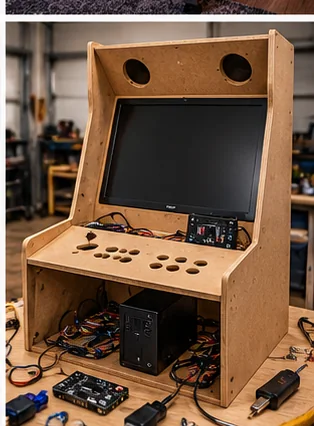
A DIY cabinet should be designed around service access
It is easy to draw a cabinet that looks like an arcade silhouette. It is harder to build one where the monitor can be removed, the PC can be reached, buttons can be replaced and speakers can be serviced without dismantling the whole machine. Before cutting wood, draw the back door, control-panel hinge or removable panel and cable route.
Airflow belongs in the design from the beginning. Mini PCs, power supplies and amplifiers are efficient but still make heat. Intake low, exhaust high, keep dust screens accessible and avoid sealing electronics into a decorative box with no ventilation.
Software and game licensing are separate from hardware
HomeArcadeGuide should be able to tell you what hardware is useful without encouraging unlicensed game acquisition. Use software and ROMs you are legally entitled to run. That keeps the build focused on controls, display, latency and cabinet quality instead of turning a hardware guide into a piracy tutorial.
Before checkout
- Measure final cabinet footprint and player standing space
- Measure the entire delivery route before ordering
- Confirm game list, control layout and number of players
- Check screen size and viewing angle from normal stance/seating
- Confirm Wi-Fi/Ethernet needs and whether online features are optional
- Price stools, risers, mats and surge protection with the machine
- Check warranty, freight damage and return terms
- Confirm replacement controls or parts are realistically obtainable
- Plan ventilation and service access
- Use only game/software content you have the rights to run
Installed cost: the part listings do not show
Budget freight or local pickup, stools or seating, floor protection, surge protection, network access, extension of an existing wired network where appropriate, and an initial parts reserve. If a machine requires permanent electrical work, treat that as room infrastructure rather than hiding it inside the cabinet price. A collection that arrives under budget but has no comfortable place to stand or sit is not actually under budget.
Measure the route with packaging in mind when a machine ships assembled or partly assembled. Door width is only one constraint; stair turns, ceiling height, railings, elevators and the ability to rotate a long cabinet matter. HomeArcadeGuide's doorway and shipping planners exist to catch those mistakes before freight arrives.
How to evaluate the purchase in the first week
Play the games and controls you bought it for, not only the easiest title on the menu. Test every direction/button, both players, audio at quiet and loud levels, network reconnect after power-off, display uniformity and cabinet wobble. If it is a virtual or software-driven platform, update only after confirming the current machine works and documenting its starting state.
Keep the carton and packing material until the return window and freight-damage inspection are safely behind you. Large arcade products are unusually expensive to return, and original packaging can matter if a display or control panel needs to travel for service.
Frequently asked questions
Is 5:4 okay for 4:3 arcade games?
Yes. It is close enough that small pillarbox bars can preserve correct 4:3 geometry.
What size is best for a bartop?
Often 17–19 inches; a 24-inch display usually pushes the cabinet toward a larger countertop footprint.
Do I need 144Hz?
Not for most original arcade emulation, though high refresh can help certain modern/latency-sensitive builds.
Can I use a TV?
Yes in larger cabinets, but verify input lag, auto-power behavior and mounting depth.
Primary/current sources
Affiliate disclosure: HomeArcadeGuide.com may earn from qualifying purchases through Amazon Associates and eBay Partner Network at no extra cost to you. Manufacturer links in the source section are research references, not tracked endorsements.